

Description
Download One Second Video – Creative, Free, Multimedia, Video Tool, Desktop Application
Overview
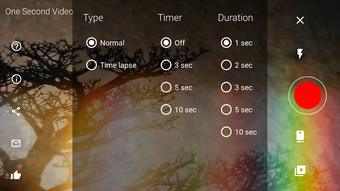
One Second Video is a creative multimedia tool designed to capture and compile memories in a unique way. The software allows users to record multiple one-second clips and automatically combine them into a cohesive short video. This innovative approach to video creation sets it apart from conventional recording applications, offering a fun and interactive method for preserving moments. The target audience includes casual users, content creators, and anyone interested in quick, engaging video content. The developer, Hemant Shetty, has crafted a user-friendly experience that emphasizes simplicity and creativity. Real-world usage scenarios include capturing daily highlights, creating time-lapse effects, or sharing quick video stories with friends and family. The software is available for free download, making it accessible to a broad range of users. The developer did not provide additional system requirements.
Key Features & Capabilities
- One-Second Recording: Users can record individual clips of exactly one second in duration, enabling rapid capture of multiple moments.
- Automatic Video Compilation: The software automatically stitches together all recorded one-second clips into a single continuous video.
- Customization Options: Users can enhance their videos by adding music and applying filters to create a personalized look and feel.
- Simple Interface: The home screen features a large record button, ensuring intuitive navigation and ease of use for all skill levels.
- Memory Preservation: Ideal for capturing fleeting moments, such as a child's first steps or a spontaneous celebration, in a creative and shareable format.
User Interface, Workflow & Performance
The user interface of One Second Video is designed with simplicity in mind. The home screen centers around a prominent record button, minimizing complexity and allowing users to start recording immediately. Navigation is straightforward, with essential functions accessible through a clean layout. The workflow is efficient, requiring minimal steps to record and compile videos. Users can record multiple clips in succession, and the software handles the merging process seamlessly. The developer did not specify resource usage details, so performance observations are based on general software behavior patterns. Stability is expected to be consistent with the application's lightweight nature, though exact CPU and RAM behavior were not provided. The software appears to be optimized for quick operations, aligning with its purpose of rapid video creation.
Compatibility & System Requirements
One Second Video is compatible with the operating system specified in the input. The software version and installation size are available, but exact system requirements were not listed. Compatibility information was partially provided. The developer did not specify hardware requirements beyond the OS. Users should ensure their system meets the basic needs of a modern desktop application to run the software smoothly.
Pros and Cons
Pros
- Unique one-second recording feature for creative video compilation.
- Automatic merging of clips into a single video reduces manual effort.
- Simple and intuitive interface suitable for users of all experience levels.
- Free to download and use, enhancing accessibility.
- Offers customization with music and filters for personalized output.
Cons
- Exact performance details were not specified.
- Compatibility information is limited.
- Resource usage behavior is not documented.
- Customization options may be limited compared to professional video editors.
- Version and size information may not reflect the latest updates.
FAQ Section
Is One Second Video available for desktop platforms?
Yes, One Second Video is available as a desktop application. The software is designed for use on desktop systems.
Is the software free to use?
Yes, One Second Video is free to download and use. There are no costs associated with the basic functionality.
Can I use the software offline?
Yes, One Second Video can be used without an internet connection. All recording and editing features are available offline.
How often are updates released?
The update frequency was not specified. Users are advised to check for updates periodically through the software or official channels.
What license type does the software use?
The license type was not provided in the available information.
Final Thoughts + CTA
One Second Video stands out as a creative and accessible tool for capturing and sharing moments in a unique way. Its innovative one-second recording and automatic compilation feature offer a fun alternative to traditional video editing. The simple interface ensures that users can start creating videos immediately, while customization options add a personal touch. Although detailed performance and compatibility information are limited, the software's lightweight design suggests smooth operation. It is particularly beneficial for casual users and content creators seeking a quick and engaging way to produce video content. Overall, One Second Video delivers on its promise of creative memory preservation. Download One Second Video now.
Guides & Tutorials for One Second Video APK
How to install One Second Video APK
- Click the Preview / Download button above.
- Once redirected, accept the terms and click Install.
- Wait for the One Second Video APK download to finish on your device.
How to use One Second Video APK
This software is primarily used for its core features described above. Open the app after installation to explore its capabilities.
User Reviews for One Second Video APK 0
No reviews found





